> ## Documentation Index
> Fetch the complete documentation index at: https://tomee-mintlify-97b9ea5c.mintlify.site/llms.txt
> Use this file to discover all available pages before exploring further.
# Speakeasy
> Display autogenerated SDK code samples from Speakeasy in your API playground with multi-language examples for Python, TypeScript, Go, and more.
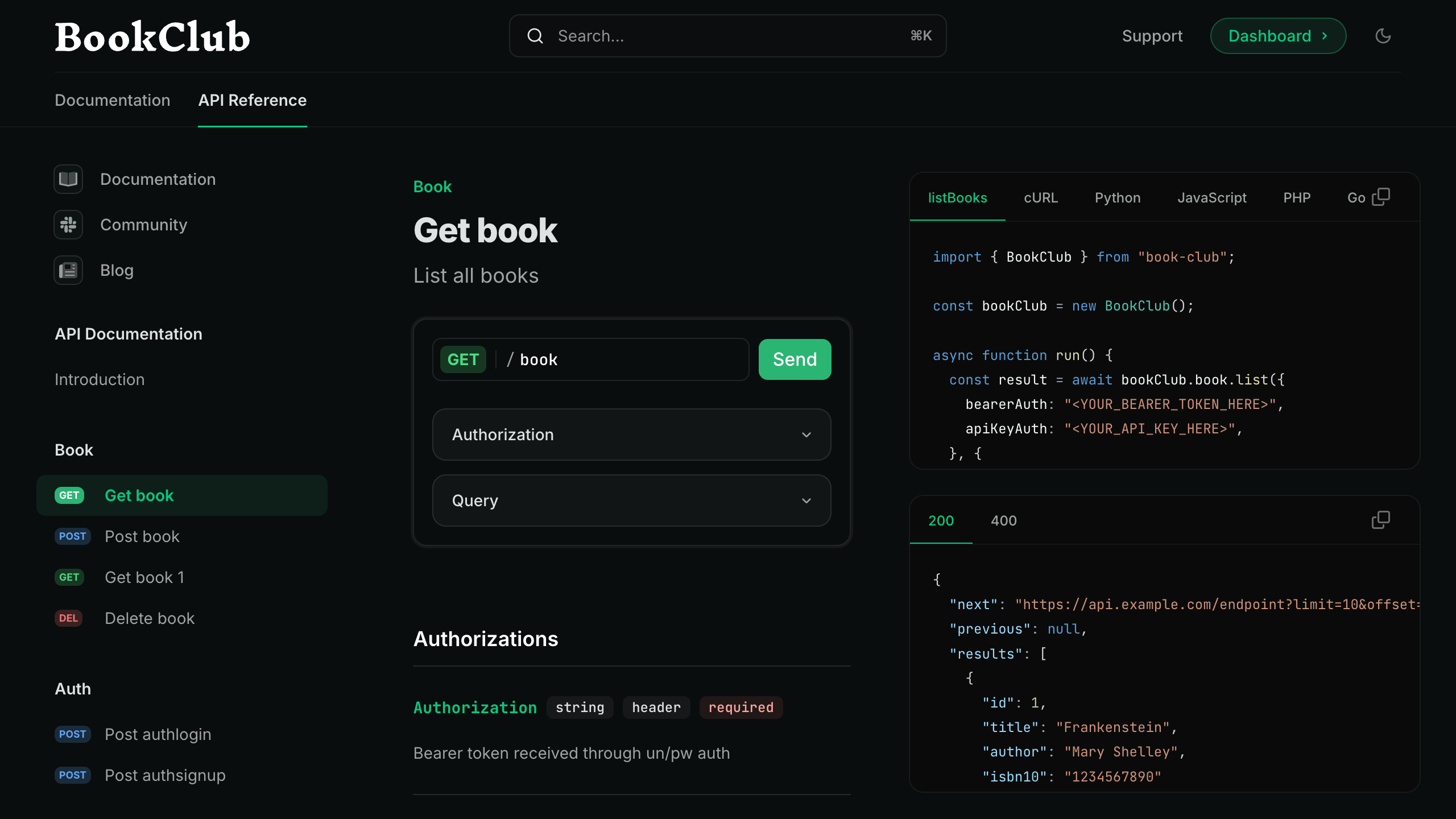
You can integrate autogenerated code snippets from Speakeasy SDKs directly into Mintlify API reference documentation. SDK usage snippets appear in the [interactive playground](/api-playground/overview) of Mintlify-powered documentation sites.
 ## Prerequisites
To integrate Mintlify with Speakeasy, you'll need the following:
* A [Mintlify documentation repository](/quickstart).
* A Speakeasy-generated SDK with a configured [automated code sample URL](https://www.speakeasy.com/docs/code-samples/automated-code-sample-urls).
## Set up the integration
To integrate Speakeasy with Mintlify, you must get the API's combined spec public URL from the registry and update your `docs.json` configuration file.
### Get the API's combined spec public URL from the registry
Go to your [Speakeasy Dashboard](https://app.speakeasy.com) and open the **API Registry** tab. Open the `*-with-code-samples` entry for the API.
## Prerequisites
To integrate Mintlify with Speakeasy, you'll need the following:
* A [Mintlify documentation repository](/quickstart).
* A Speakeasy-generated SDK with a configured [automated code sample URL](https://www.speakeasy.com/docs/code-samples/automated-code-sample-urls).
## Set up the integration
To integrate Speakeasy with Mintlify, you must get the API's combined spec public URL from the registry and update your `docs.json` configuration file.
### Get the API's combined spec public URL from the registry
Go to your [Speakeasy Dashboard](https://app.speakeasy.com) and open the **API Registry** tab. Open the `*-with-code-samples` entry for the API.
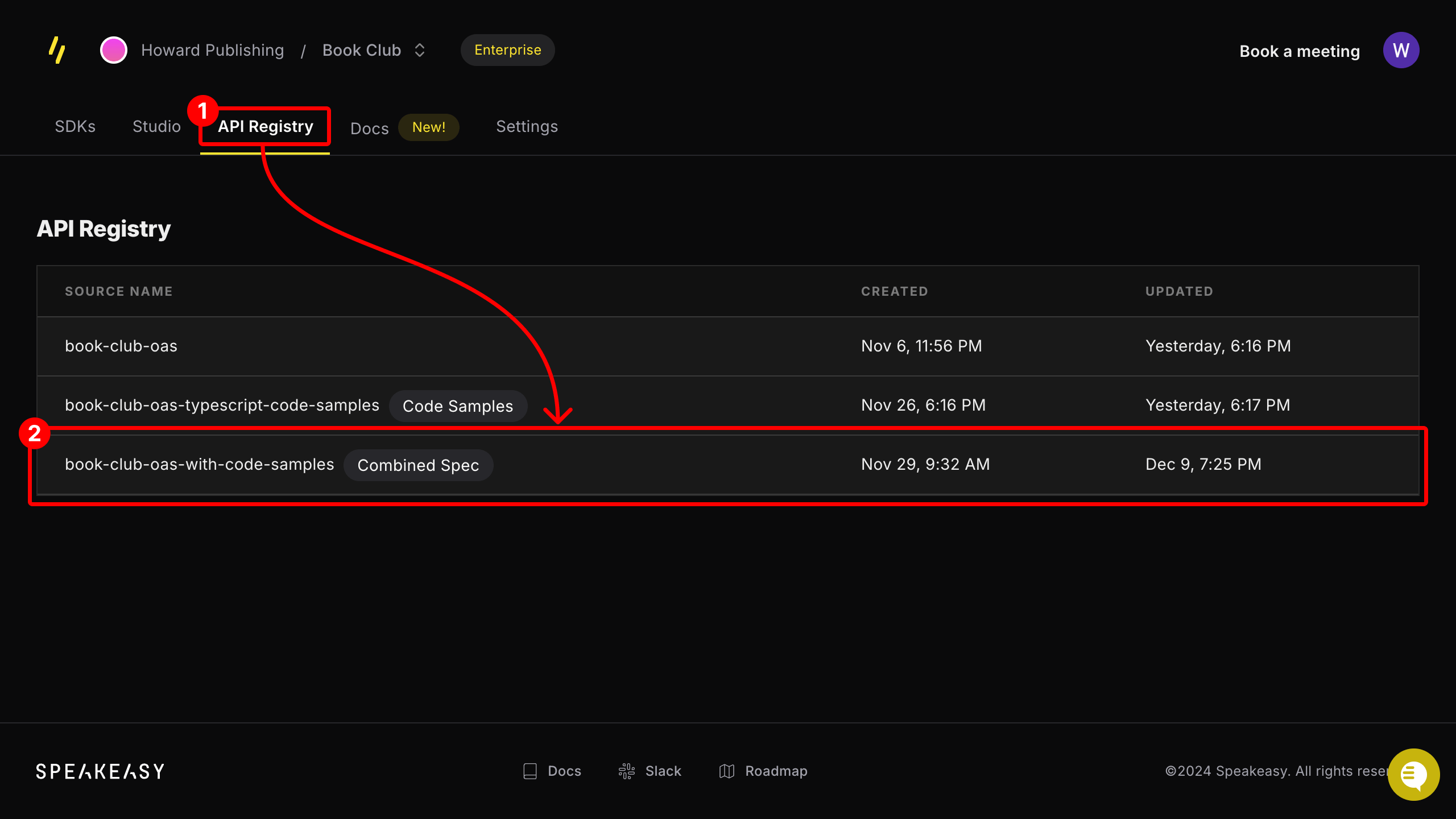 If the entry is not labeled **Combined Spec**, ensure that the API has an [automatic code sample URL](https://www.speakeasy.com/docs/code-samples/automated-code-sample-urls) configured.
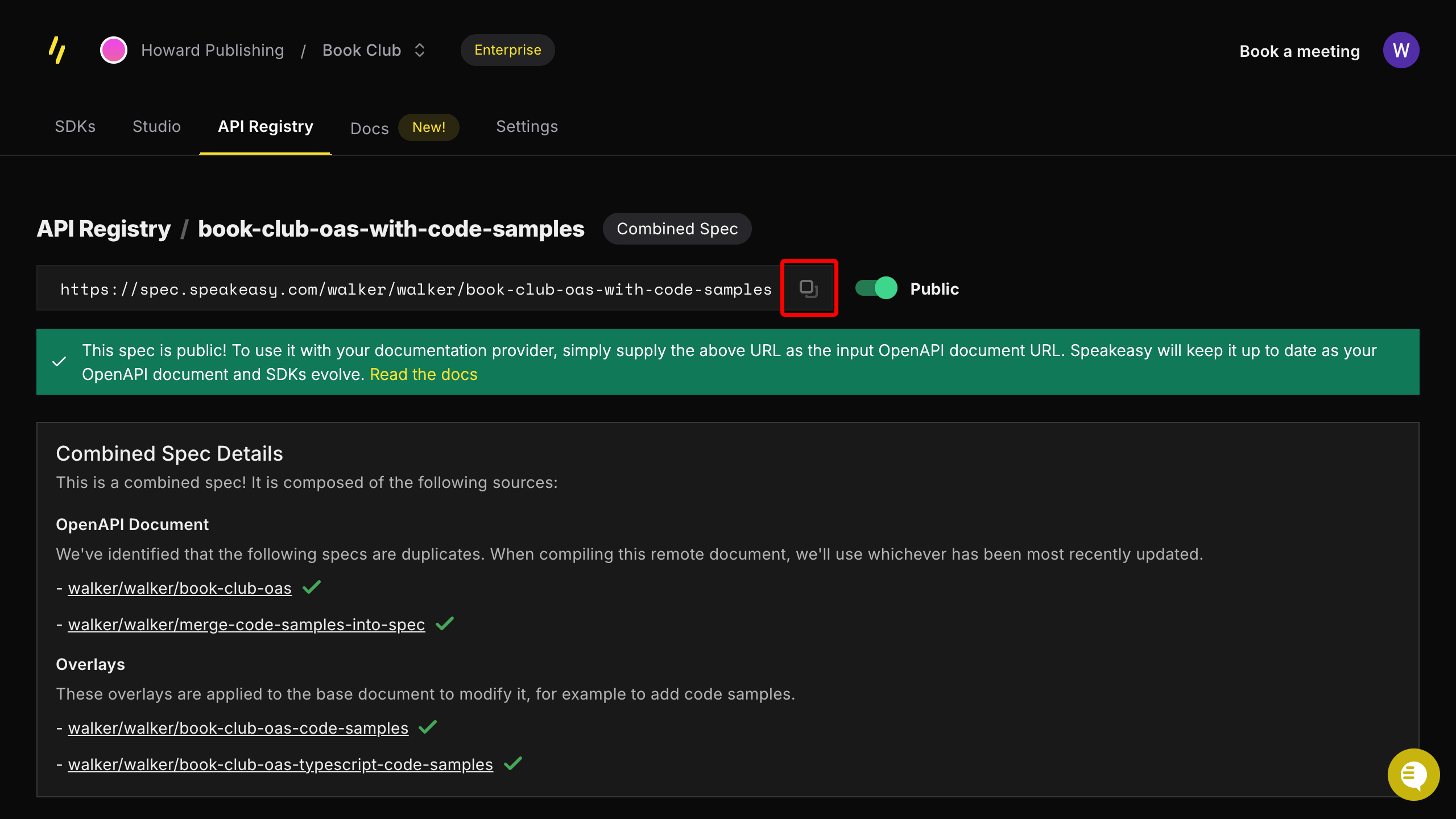
From the registry entry's page, copy the provided public URL.
If the entry is not labeled **Combined Spec**, ensure that the API has an [automatic code sample URL](https://www.speakeasy.com/docs/code-samples/automated-code-sample-urls) configured.
From the registry entry's page, copy the provided public URL.
 ### Update your `docs.json` configuration file
Add the combined spec URL to an **Anchors** or **Tabs** section in your `docs.json` file.
Add the combined spec URL to an anchor by updating the `anchor` field in your `docs.json` file as follows:
```json docs.json theme={null}
{
"anchors": [
{
"name": "API Reference",
// !mark
"openapi": "SPEAKEASY_COMBINED_SPEC_URL",
"url": "api-reference",
"icon": "square-terminal"
}
]
}
```
Add the combined spec URL to a tab by updating the `tab` field in the `docs.json` file as follows:
```json docs.json theme={null}
{
"tabs": [
{
"name": "API Reference",
"url": "api-reference",
// !mark
"openapi": "SPEAKEASY_COMBINED_SPEC_URL"
}
]
}
```
You can now view Speakeasy-generated code snippets in your API docs and interact with them in the playground.
## Verify the integration
After you redeploy your documentation, open any endpoint in your API reference and confirm that language snippets appear in the playground. The set of available languages matches the SDK targets configured in your Speakeasy project.
If snippets do not appear, check that:
* The `openapi` URL in `docs.json` points to the `*-with-code-samples` combined spec entry, not the source OpenAPI file.
* The combined spec URL is publicly reachable from the browser.
* Your Speakeasy project has an [automated code sample URL](https://www.speakeasy.com/docs/code-samples/automated-code-sample-urls) configured and at least one SDK target enabled.
### Update your `docs.json` configuration file
Add the combined spec URL to an **Anchors** or **Tabs** section in your `docs.json` file.
Add the combined spec URL to an anchor by updating the `anchor` field in your `docs.json` file as follows:
```json docs.json theme={null}
{
"anchors": [
{
"name": "API Reference",
// !mark
"openapi": "SPEAKEASY_COMBINED_SPEC_URL",
"url": "api-reference",
"icon": "square-terminal"
}
]
}
```
Add the combined spec URL to a tab by updating the `tab` field in the `docs.json` file as follows:
```json docs.json theme={null}
{
"tabs": [
{
"name": "API Reference",
"url": "api-reference",
// !mark
"openapi": "SPEAKEASY_COMBINED_SPEC_URL"
}
]
}
```
You can now view Speakeasy-generated code snippets in your API docs and interact with them in the playground.
## Verify the integration
After you redeploy your documentation, open any endpoint in your API reference and confirm that language snippets appear in the playground. The set of available languages matches the SDK targets configured in your Speakeasy project.
If snippets do not appear, check that:
* The `openapi` URL in `docs.json` points to the `*-with-code-samples` combined spec entry, not the source OpenAPI file.
* The combined spec URL is publicly reachable from the browser.
* Your Speakeasy project has an [automated code sample URL](https://www.speakeasy.com/docs/code-samples/automated-code-sample-urls) configured and at least one SDK target enabled.